 XLSX
XLSX
Technical Specifications
Document Classification
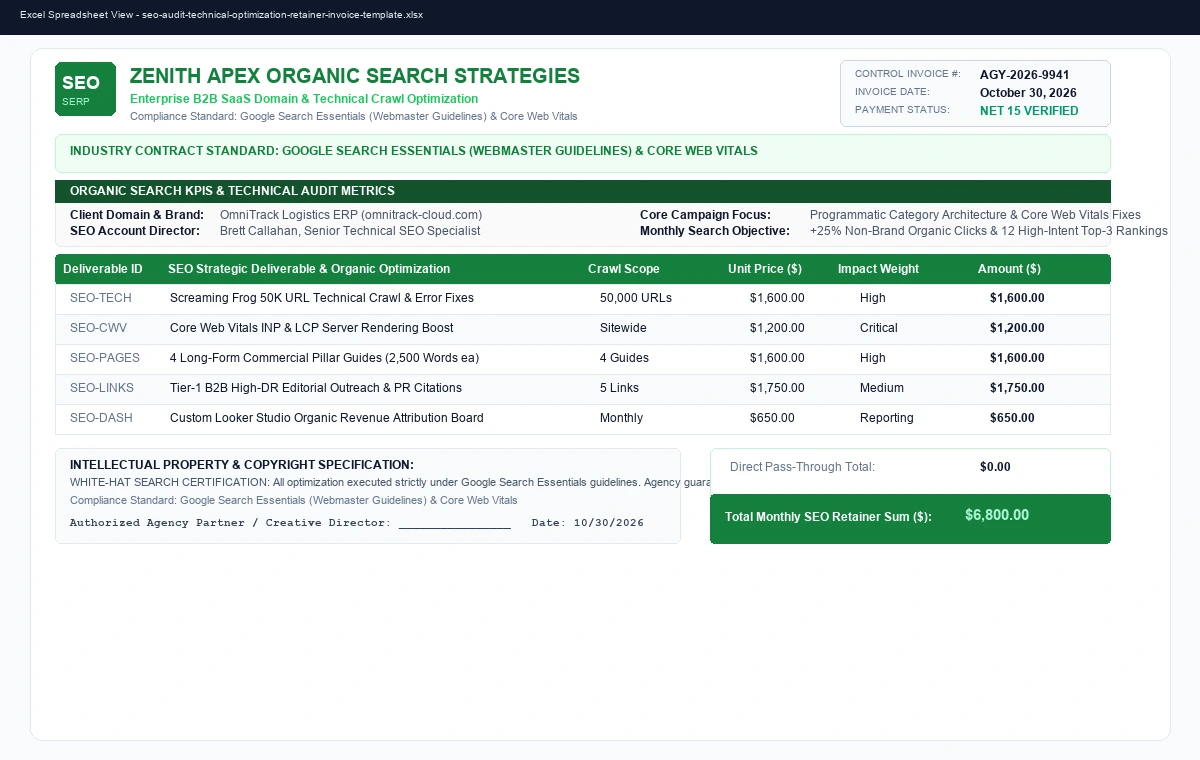
SEARCH ENGINE OPTIMIZATION (SEO) MONTHLY PERFORMANCE INVOICE
File Formats
Microsoft Excel (.xlsx), Google Sheets, Print PDF
Industry Standard
Google Search Essentials (Webmaster Guidelines) & Core Web Vitals
Calculation Logic
Milestone Deliverables × Retainer Rates + Media Pass-Throughs
Commercial License
Free (Agencies, Freelancers & Independent Creators Commercial License)
Formula / Edit Status
100% Unlocked (Zero Password Restrictions or Protected Sheets)
Live Agency & Freelance Pricing Simulator
Interactive Project Quote & Effective Hourly Rate Calculator
Calculate your target project bid, account for software licenses and font assets, and benchmark your effective hourly rate before presenting proposals:
Recommended Client Project Quote & Effective Hourly Rate
$6,267.50
EFFECTIVE RATE: $145.44 / HR
Professional Guide: Mastering SEO Audit, Technical Optimization & Ranking Retainer Statement
In the digital services economy, clear contractual billing is essential to prevent scope creep, protect creative intellectual property, and ensure predictable monthly recurring revenue. Whether managing an enterprise PPC budget, completing a multi-phase Figma design system, writing a technical whitepaper, or licensing commercial photography, a structured statement establishes immediate trust with corporate finance teams. Our free SEO Audit, Technical Optimization & Ranking Retainer Statement gives creative entrepreneurs and digital agencies a battle-tested template engineered for prompt Net 15/30 settlement.
Core Capabilities Built Into This Workbook
- Milestone & Retainer Cost Engines: Native spreadsheet logic supporting monthly retainers, per-word content rates, day rates, and phased milestone percentages with zero rounding errors.
- Intellectual Property & Copyright Release: Features explicit copyright assignment clauses specifying that ownership transfers only after final invoice settlement.
- Industry Code Compliance: Formatted to align with professional association guidelines including Google Search Essentials (Webmaster Guidelines) & Core Web Vitals.
- Universal Compatibility: 100% unlocked native Microsoft Excel (.xlsx) format ready for Google Sheets, Apple Numbers, and PDF export for accounting portals.
Step-by-Step Agency Operational Workflow
- Customize Master Agency Profile: Insert your studio branding, payment details (ACH/Wire/Stripe), and registered corporate entity name.
- Document Sprint Deliverables: Itemize completed milestone deliverables, Figma screen counts, ad spend tiers, or word counts.
- Verify Revision Limits: Ensure additional client rounds beyond contractual scope are logged as separate billed line items.
- Export Clean PDF Statement: Export directly to an institutional PDF invoice and deliver via email or client client-portal for rapid remittance.
Frequently Asked Questions
When does copyright transfer to the client for creative work?
Under standard AIGA and ASMP agreements, intellectual property and commercial copyright remain the exclusive property of the creator until the final invoice is paid in full. This invoice template includes a formal IP reservation clause that legally prevents unauthorized client publication prior to settlement.
How should agencies handle third-party expenses like media ad spend?
Best practice recommends having clients connect their corporate credit card directly to ad networks (Google Ads, Meta Business Manager) so ad spend is not recognized as agency revenue. If managing spend through agency credit lines, a separate line item with an agreed management fee (typically 10% - 15%) must be itemized.
Can I add my agency logo and payment links?
Yes. The template is 100% unlocked in native Microsoft Excel (.xlsx) format. You can insert your company logo, modify color themes to match your agency branding, and add clickable Stripe, PayPal, or ACH bank wiring instructions.