NW
The automated sales tax and discount calculations worked right out of the box. Added my business logo, exported to PDF, and billed my client in under 5 minutes. Clean and professional.

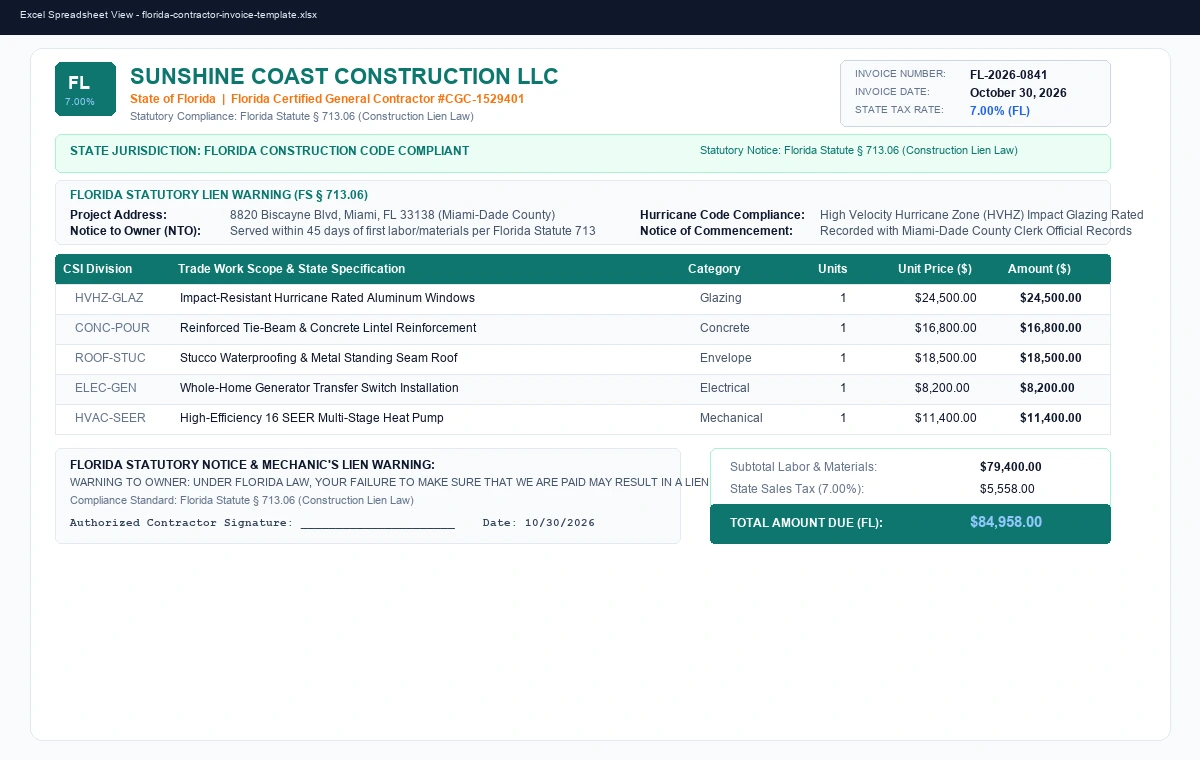
Test your Florida contractor billing sums and verify sales tax withholding before downloading the full Excel model:
The Florida Construction Invoice & Notice to Owner (NTO) Template is a dedicated construction billing spreadsheet model handcrafted specifically for general contractors, trade subcontractors, remodelers, and commercial project managers operating in the state of Florida. Construction invoicing in Florida requires precision adherence to state statutes, mandatory preliminary notice disclosures, retainage withholdings, and exact FL sales tax rates (7.00%). This template embeds these legal frameworks directly into an unlocked Excel model governed by Florida Statute § 713.06 (Construction Lien Law).
Engineered without complicated VBA macros or password locks, every cell and formula in this template remains 100% unlocked. You can freely adjust CSI division line items, tweak local municipal surtaxes, or export clean draw schedules for lenders and title escrow officers.
This workbook relies purely on native spreadsheet mathematical functions, ensuring lightning-fast execution and complete fidelity across Microsoft Excel, Google Sheets, and mobile spreadsheet apps:
=LaborSubtotal + MaterialsSubtotal — Itemizes total trade scope before statutory tax withholding.=TaxableMaterials * 0.07 — Automatically applies the FL state sales tax rate (7.00%).=(Subtotal + Tax) - RetainageAmount — Calculates the net contractor draw amount due upon inspection sign-off.florida-contractor-invoice-template.xlsx locally.Yes. The template incorporates statutory warning and notice formatting aligned with Florida Statute § 713.06 (Construction Lien Law). Always verify project-specific recording deadlines with your local county recorder or legal counsel.
Yes. The tax formula is completely unlocked. You can update cell rates to account for local city or county surtax additions applicable to your specific project municipality.
Yes, absolutely. Download the florida-contractor-invoice-template.xlsx file to your device, head to Google Drive, click + New > File upload, and open it. Google Sheets will convert and display all formulas, tables, and typography natively.
No payment is required. All assets provided in the OfficeTemplateHub library are distributed free of charge. You can use this workbook in client reports, bids, and commercial projects without royalty fees.
Feedback and ratings from professionals who downloaded this template.
The automated sales tax and discount calculations worked right out of the box. Added my business logo, exported to PDF, and billed my client in under 5 minutes. Clean and professional.
Much better than clunky subscription billing software. Opened smoothly in Google Sheets with zero formula errors, and print margins are already calibrated for A4 and US Letter.
More handcrafted, state-statute compliant contractor invoice spreadsheets for US building contractors.